

 By
By Introduction
Excel jobs for freshers are becoming more popular in 2026 as companies across the global world continue to rely on Microsoft Excel for reporting, analysis, and business decision-making.
If you’ve recently learned Microsoft Excel, you might be wondering:
Can Excel alone really help me get a job?
It’s a fair question.
With AI tools, automation software, and advanced analytics platforms dominating headlines, Excel can feel basic.
But here’s the reality:
Excel remains one of the most in-demand business tools across the Global World such as United States, United Kingdom, and Canada and so on.
From finance teams in New York to operations departments in London and reporting analysts in Toronto, Excel is deeply embedded in how businesses operate.
If you’re searching for:
- Jobs you can get after learning Excel
- Entry-level Excel jobs
- Excel jobs for beginners with no experience
- High paying jobs using MS Excel
Because of this, Excel jobs for freshers are becoming increasingly popular across industries like finance, operations, MIS reporting, and data analysis.
According to the U.S. Bureau of Labor Statistics, employment in data-related roles continues to grow steadily across North America, reflecting strong demand for analytical and Excel-based skills in business environments.
This blog will walk you through realistic, globally relevant career options.
Let’s break it down properly.
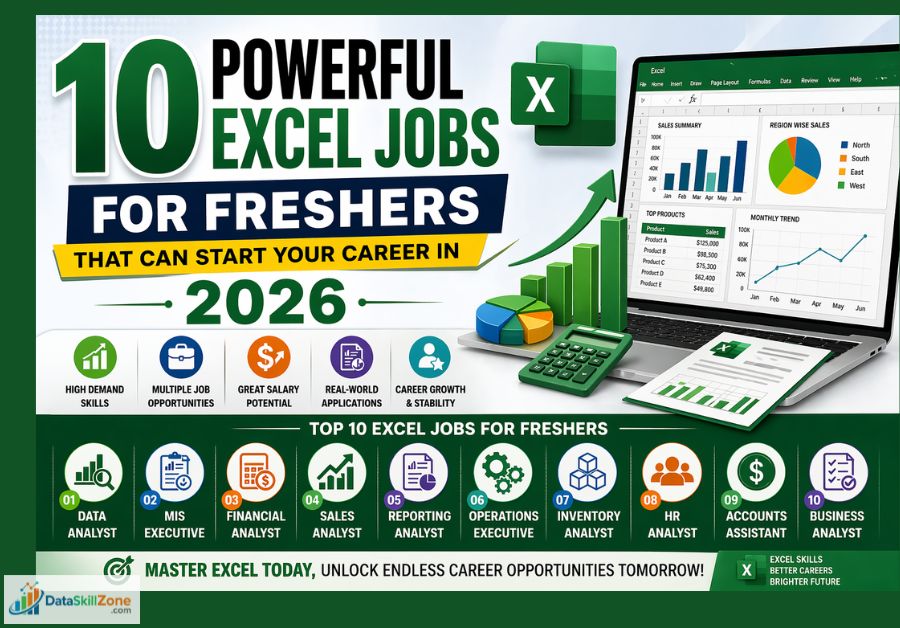
Excel jobs for freshers in 2026 include Data Analyst, MIS Executive, Financial Analyst, Sales Analyst, Reporting Analyst, and Operations roles. Strong Excel skills in formulas, Pivot Tables, dashboards, and reporting can help you start your career.
Are Excel Jobs for Freshers Still in Demand?
Despite newer data tools, Excel continues to dominate because:
- It’s flexible
- It integrates with almost every system
- It’s accessible to non-technical teams
- It requires no coding
- It’s trusted by decision-makers
Businesses use Excel for:
- Financial forecasting
- Budget tracking
- Sales performance analysis
- Inventory management
- HR reporting
- KPI dashboards
- Operational planning
In many small and mid-sized companies across the US, UK, and Canada, Excel is still the primary analytics tool.
That makes it a powerful entry point into the corporate world.
Best Excel Skills That Help Freshers Get Hired
Why Excel Skills Are Important for Jobs
For freshers who are starting their careers, learning Excel can significantly increase job opportunities. Many entry-level roles require candidates to handle data, create reports, and organize information, and Excel makes all of these tasks easier.
Below are some key reasons why Excel skills are highly valuable in the job market.
If you want to improve your spreadsheet knowledge further, explore our complete guide on Excel Skills for Data Analysis to learn the most valuable formulas, reporting tools, and practical techniques.
1. Excel Helps Manage and Organize Large Amounts of Data
With Excel, employees can:
- Store large amounts of business data in spreadsheets
- Sort and filter information quickly
- Categorize data for better understanding
- Maintain structured records for reporting and analysis
Because of these capabilities, Excel is widely used in roles such as MIS Executive, Data Entry Operator, Operations Executive, and Business Analyst.
2. Excel Makes Reporting and Analysis Easier
Professionals often need to analyze numbers and present the results in a clear way. Excel provides many built-in tools that make this process easier.
For example, Excel allows users to:
- Create pivot tables to summarize large datasets
- Use formulas like SUM, IF, and VLOOKUP to perform calculations
- Build charts and graphs to visualize business performance
- Track trends and patterns in data
These features help organizations make better business decisions, which is why Excel knowledge is often considered a core skill for many office jobs.
3. Excel Is Used in Multiple Industries
Some industries where Excel skills are commonly required include:
- Finance and accounting
- Sales and marketing
- Operations and supply chain
- Human resources
- Banking and insurance
- Data analytics and business intelligence
Because Excel is used across so many fields, freshers who learn Excel can explore multiple career paths instead of being limited to one role.
4. Excel Is Often the First Step Toward Data Careers
Many professionals who work in advanced data roles today started their careers by learning Excel.
For example, careers such as:
- Data Analyst
- Business Analyst
- MIS Analyst
- Financial Analyst
often require strong Excel skills in the beginning.
Once a person becomes comfortable working with data in Excel, they can gradually learn more advanced tools such as:
- SQL
- Power BI
- Tableau
- Python for data analysis
This makes Excel a great starting point for building a long-term career in data and analytics.
5. Excel Skills Improve Productivity at Work
Employees who know how to use Excel effectively can complete tasks much faster than those who rely on manual processes.
Excel helps automate many repetitive tasks such as calculations, data cleaning, and report generation.
For example, Excel can help employees:
- Save time by using formulas instead of manual calculations
- Create reusable templates for reports
- Quickly analyze large datasets
- Reduce errors in data processing
Because of these advantages, many employers actively look for candidates who already have basic to intermediate Excel skills.
To qualify for Excel jobs for freshers, candidates should develop a strong understanding of spreadsheet functions, formulas, and basic data analysis techniques.
Which Excel Job Fits You Best?
- Love reports & dashboards? Try MIS Executive
- Love numbers? Try Financial Analyst
- Love business growth? Try Sales Analyst
- Love solving problems? Try Operations Analyst
- Love data insights? Try Data Analyst
Best Excel Jobs for Freshers in 2026

1. Data Analyst (Entry-Level)
Yes, you can absolutely start your career as a data analyst using Excel.
Many small and mid-sized companies still rely heavily on Excel for cleaning data, analyzing trends, and building performance reports.
If you understand pivot tables, data visualization, and basic analytical thinking, Excel alone can qualify you for entry-level data analyst roles while you continue building advanced skills..
As a junior data analyst, your responsibilities may include:
- Identifying sales patterns
- Tracking performance metrics
- Creating management reports
- Supporting business decisions with data
In the US, entry-level data analysts typically start between $55,000–$70,000 annually depending on location. In the UK and Canada, salaries vary but remain competitive for beginners.
Excel often becomes your foundation before learning SQL or Power BI.
If you’re planning to apply for analyst roles, make sure your resume highlights real Excel projects and measurable impact. This detailed data analyst resume guide explains exactly how to structure your resume for ATS screening and recruiter shortlisting.
2. Financial Analyst
Finance teams across North America and the UK depend on Excel daily.
You might work on:
- Budget planning
- Revenue forecasting
- Profit and loss statements
- Variance analysis
- Investment modeling
Financial modeling in Excel is still an industry standard.
Entry-level financial analyst roles in the US often begin around $60,000+, with strong growth potential.
If you enjoy numbers and structured analysis, this path offers long-term earning power.
3. Sales Analyst
Sales teams run on performance data.
Excel is used to:
- Track revenue
- Compare regional performance
- Calculate commissions
- Analyze growth trends
Sales analysts convert raw sales numbers into insights management can act on.
This role is ideal if you enjoy business performance tracking and dashboard creation.
4. Operations Analyst
Operations teams use Excel to monitor internal efficiency.
Responsibilities may include:
- Inventory tracking
- Supply chain monitoring
- Vendor performance analysis
- Cost optimization reports
Excel-based operational reporting helps companies reduce inefficiencies and improve margins.
5. Business Analyst (Excel-Focused Environments)
While most of the business analysts use advanced tools, Excel remains essential.
In smaller firms especially, Excel is used for:
- Requirement tracking
- Process analysis
- Financial projections
- Performance dashboards
If you can structure data clearly and communicate insights, Excel can open doors into business analysis roles.
6. Accounts Payable / Accounts Receivable Specialist
Accounting departments rely heavily on spreadsheets.
You may handle:
- Invoice tracking
- Payment reconciliation
- Expense summaries
- Vendor reports
Excel accuracy is critical in finance operations.
This role offers stability and structured career growth.
7. Reporting Analyst
Reporting analysts specialize in turning large datasets into digestible summaries.
You’ll likely:
- Create dashboards
- Automate recurring reports
- Highlight performance metrics
- Support leadership decisions
If you enjoy organizing and presenting information clearly, this role is a strong fit.
8. HR Data Analyst
HR departments track employee data in Excel. HR departments use Excel extensively to manage and organize employee-related data in a structured and secure manner.
Even in organizations that use HR software, Excel often serves as the primary tool for customized reporting and internal analysis.
Common tasks include:
- Workforce analytics
- Attendance reporting
- Payroll tracking
- Attrition analysis
HR analytics is growing globally, and Excel is often the starting tool.
9. Inventory Analyst
Retail and logistics companies rely on Excel to manage stock levels.
You may:
- Monitor product movement
- Forecast demand
- Track supply levels
- Prevent overstocking or shortages
Strong spreadsheet skills are essential here. Even when advanced inventory systems are in place, Excel is often used for customized analysis, reporting, and operational planning.
10. Project Coordinator
Project management teams rely on Excel to monitor timelines, control budgets, and keep projects aligned with planned objectives. Spreadsheets are often used to create task trackers, allocate resources, calculate projected costs, and compare actual spending against approved budgets.
You might manage:
- Task tracking sheets
- Budget spreadsheets
- Resource allocation plans
- Milestone reporting
Excel helps ensure projects stay on schedule and within budget.
By maintaining structured project data in one place, teams can quickly identify delays, manage risks, and ensure projects stay on schedule and within financial limits.
Best Excel Jobs for Freshers – Quick Comparison
How to Increase Your Chances of Getting Hired with Excel

Learning formulas is not enough.
Employers are not just looking for someone who knows formulas; they want someone who can organize messy data, build clear reports, and support decision-making with structured analysis.
You must demonstrate application.
Build projects like:
- Sales performance dashboard
- Budget tracking system
- Financial forecast model
- HR attrition analysis report
If you don’t have real corporate experience yet, you can still build strong portfolio projects. Here’s how to practice data skills effectively without access to company datasets.
When recruiters see real examples of your work, it immediately builds credibility and separates you from candidates who only list “Advanced Excel” on their resume.
Next, focus on measurable impact. For example, you could say you built an automated reporting sheet that reduced manual work or created a dashboard that tracked monthly performance metrics.
When you combine technical skills, practical application, and business understanding, your chances of landing an Excel-based job increase significantly.
Recruiters value real-world problem solving more than certifications.
Is Excel Enough for Long-Term Career Growth?
Excel is the starting point. It is strong enough to help you start your career, especially in entry-level analyst, reporting, finance, and operations roles.
In the early stage of your career, Excel can help you:
- Build reports and dashboards
- Understand KPIs and business metrics
- Support data-driven decisions
- Improve data accuracy and organization
However, for long-term growth and higher salaries, you’ll need to expand your skills. After mastering advanced Excel, consider learning:
- SQL
- Power BI or Tableau
- Basic data analytics concepts
- Financial modeling (if you prefer finance roles)
Excel is your foundation skill. It gets you in the door.
Continuous learning is what helps you move into higher-paying roles like Data Analyst, Business Intelligence Analyst, or Financial Planning Analyst.
It remains a core business tool across the US, UK, and Canada, which means solid Excel skills can open real job opportunities.
Excel gives you entry into corporate environments. Skill expansion determines long-term growth.
Once you secure your first role, understanding how to discuss compensation professionally becomes important. Having a clear salary negotiation strategy can significantly improve your earning potential as you gain experience.
How to Start an Excel Career in 90 Days
- Month 1: Excel formulas + tables + charts
- Month 2: Pivot Tables + dashboards + practice files
- Month 3: Build resume + projects + apply for jobs
My Final Point Of View
Excel is not outdated.
It is foundational.
Across the US, UK, and Canada, companies still depend on professionals who can organize, analyze, and present data effectively.
If you use Excel strategically – not just technically; it can absolutely help you start a professional career.
The real opportunity isn’t in the spreadsheet.
It’s in how you use it to think.
Excel jobs for freshers provide a great starting point for anyone who wants to build a career in data, business operations, or finance.
By learning important Excel skills such as formulas, pivot tables, and data analysis, freshers can unlock many job opportunities in different industries.
Excel Can Be Your First Career Skill
You do not need to know everything to start. Master Excel first, build projects, and grow into higher-paying roles step by step.
Frequently Asked Questions
Clear answers to the most common questions about Excel jobs for freshers, salaries, skills, and career growth in 2026.
Can I get a job if I only know basic Excel?
Yes, many entry-level jobs require only basic Excel skills such as sorting data, using formulas like SUM and IF, creating simple reports, and organizing spreadsheets. Advanced Excel skills can improve your opportunities further.
What are the best Excel jobs for freshers?
Popular Excel jobs for freshers include MIS Executive, Data Entry Operator, Operations Executive, Junior Data Analyst, Accounts Assistant, Reporting Analyst, and Sales Analyst roles.
What is the salary for Excel jobs for freshers?
Salaries depend on the role, country, and company. Entry-level Excel jobs can range from beginner support roles to higher-paying analyst positions, with better growth after gaining experience and advanced skills.
How can freshers prepare for Excel jobs?
Freshers should practice formulas, Pivot Tables, dashboards, charts, and real datasets. Building sample projects and an ATS-friendly resume can improve hiring chances significantly.
What Excel skills are required for fresher jobs?
Important skills include sorting and filtering, formulas like SUM and IF, Pivot Tables, VLOOKUP or XLOOKUP, conditional formatting, charts, and basic reporting skills.
Is Excel enough for long-term career growth?
Excel is a strong starting point, but long-term growth becomes better when you add skills like SQL, Power BI, Tableau, or data analytics concepts over time.

5 Comments